 Make Mac Better
Your day at a glance
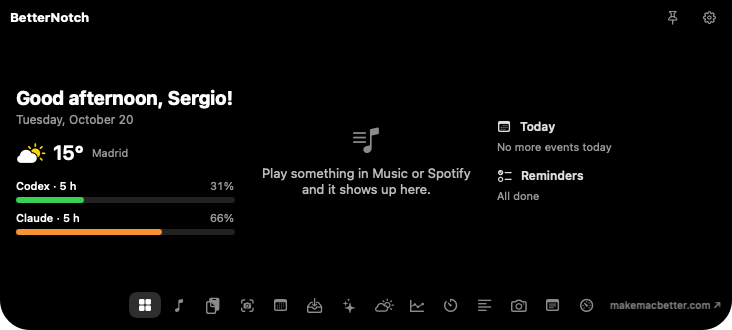
Home brings together greeting, weather, music, events, reminders and AI usage. You choose what shows and in which column.
Notch · New
Hover over the notch and it opens into a panel with your day: what’s playing, your clipboard, your screenshots, how much Codex and Claude you have left, weather, stocks, a teleprompter and more. On Macs without a notch, it draws a floating one.
Real app screenshot
Real screenshots of the open notch. Pick a tab.
Free
BetterNotch is Make Mac Better’s notch on its own: free, no licence and open source. When you want windows, Dock, 38 tools and everything else, Make Mac Better includes it.
macOS 14 or later · Apple Silicon and Intel · Signed and notarised by Apple.
How it works
Or press ⌃⌥⌘N. The notch opens with a smooth animation.
Home, music, clipboard, screenshots, AI usage, weather, stocks…
Move the pointer away and it closes. Pin it to keep it open.
Notch
Home brings together greeting, weather, music, events, reminders and AI usage. You choose what shows and in which column.
Your latest copies filtered by text, links, images or PDFs, and your latest screenshots ready to drag. Password-manager entries are never saved.
Codex: % left in the 5-hour and weekly windows, and when they reset. Claude Code: tokens in the current block and this week. Read locally, only if you connect it.
Teleprompter under the camera, a mirror to check yourself before a call, stocks, weather, timer, quick note and Mac status.
Shortcuts
With a Windows keyboard: Ctrl = ⌃, Alt = ⌥, Shift = ⇧, Windows = ⌘. All can be changed in the app.
Yes. On displays without one it draws a floating notch at the top centre.
Only what a tool needs: Weather asks Open-Meteo for the forecast and Stocks asks Yahoo Finance for quotes. Everything else stays on your Mac.
Yes: BetterNotch is the notch on its own, for free. Download it below. Make Mac Better includes it with everything else.
€19.99 forever. No subscription. Everything runs on your Mac.